For capacity providers In development
See your delegated business from the records, and decide referrals in one place.
The Cuttleflow Capacity Portal gives an insurer or Lloyd’s managing agent direct access to the business its underwriting agencies write on Cuttleflow, and one queue for the risks those agencies refer to it. It is built for APRA-authorised insurers and Lloyd’s syndicates, including binders that several carriers share.
Cuttleflow is not licensed to bind on its own account, brings no capacity, holds no binder and does not place business. The agency brings the licence, the capacity relationship, the appetite and the underwriting judgement. Capacity providers make their own underwriting decisions. We provide the systems underneath and the evidence that they behaved.
Agencies looking for licensing, compliance or capacity-broking support can find independent firms on Cuttleflow Partners. Capacity providers who want to meet new agencies can ask to be listed.
What changes for a capacity provider
Oversight from the agency’s own records, not a monthly spreadsheet.
Oversight as business is written
Policies, premium, capacity used, aggregates, bordereaux and claims come from the records each policy was bound against. Every figure shows its period and when it was calculated.
Referrals with a complete record
When a risk falls outside the binder, the agency’s underwriter sends you a referral. You decide within your own authority, and your decision and conditions are attached to the policy.
One queue across agencies
Referrals, late bordereaux, breaches, queries and audit actions from every agency that has connected you, in one list ordered by due time.
Evidence for your oversight duties
Service and incident records, a monthly oversight pack for each binder, and logs of who viewed and exported what. The portal provides evidence; your obligations remain yours.
- The base role is view only: view, export under controls, and raise queries. It cannot change agency data.
- Every view and export by your users is logged, and the agency can see that log.
- You see a binder only when the agency grants it to your organisation.
How referrals work
The underwriter sends the referral. You decide within your own authority.
- A rule flags itThe agency’s rules flag a risk the binder does not allow: a limit, class, territory or premium outside its terms. The flag stops the bind. It does not send anything.
- The underwriter sends itThe agency’s underwriter decides whether to refer, and builds the pack: the rule breached, the proposed terms, the reasons, the risk information and documents.
- It reaches the right approverRouting follows the binder and the capacity stack: the lead carrier, the carrier of the layer affected, or the panel carrier the risk is allocated to.
- You decideApprove, approve with conditions, offer other terms, ask for more information or decline. The portal checks each decision against your approver’s authority limits.
- The policy records itThe bound policy shows that it was written under your approval, with your conditions. Capacity figures and bordereaux show these risks separately.
What the referral pack contains
- The rule breached, with the threshold and the actual value
- The proposed terms and how the premium was worked out
- The underwriter’s reasons
- Proposal answers, loss history and the sanctions screening result
- The effect on capacity used and on aggregates
- The documents the underwriter chooses to include
What you do not see
- The agency’s other submissions and quotes
- Broker commission and terms of business
- Other carriers’ quotes, declinatures and lines
- The agency’s dealings with other capacity
If the agency switches it on, you see counts for your own binders: submissions, quotes, binds, declinatures and referrals, with no names.
Your approver is not limited by the binder or by the agency’s underwriting rules. Your approver is still limited by your own underwriting authority, your reinsurance, sanctions law, licensing, and the binder’s premium and aggregate limits where the risk is bound under the binder.
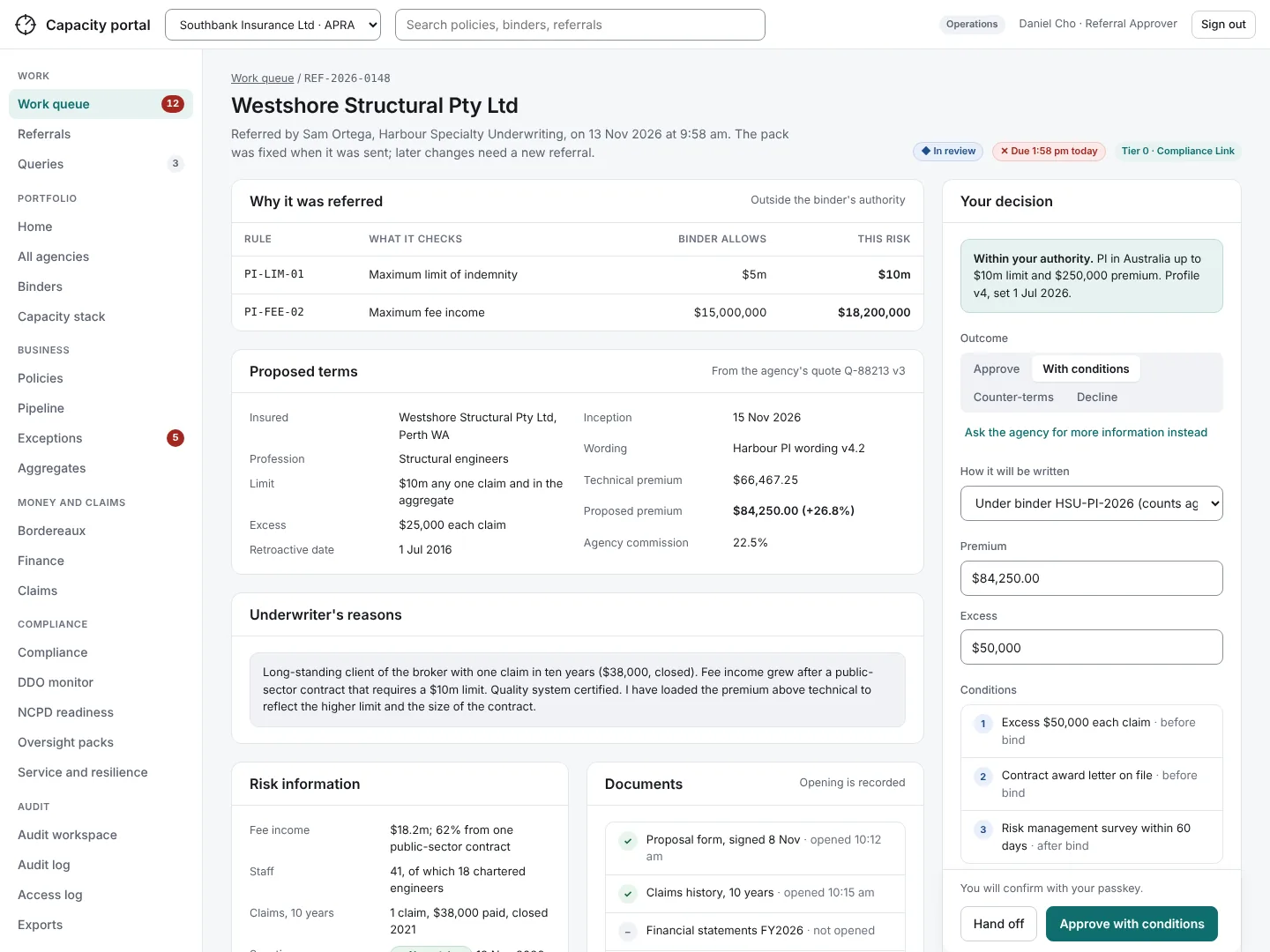
Several carriers on one binder
Each carrier sees the business it is on, and nothing else.
What a carrier sees follows its position in the capacity stack. The binder sets the rules. Where it is silent, the defaults below apply, and the agency confirms them when it sets up the binder.
| Your position | What you see |
|---|---|
| Sole carrier | Everything on the binder. |
| Lead or follower on a shared binder | Every policy you are on, at 100% and at your own share. The other participants and their lines, and the lead’s terms. |
| Excess layer | Your own layer, the underlying limits and wording, and claims that may reach your layer. Not the underlying pricing. |
| Panel carrier | Only the risks allocated to you. You cannot tell whether other panel members’ business exists. |
No carrier sees another carrier’s business on binders it is not on, or another carrier’s access log.
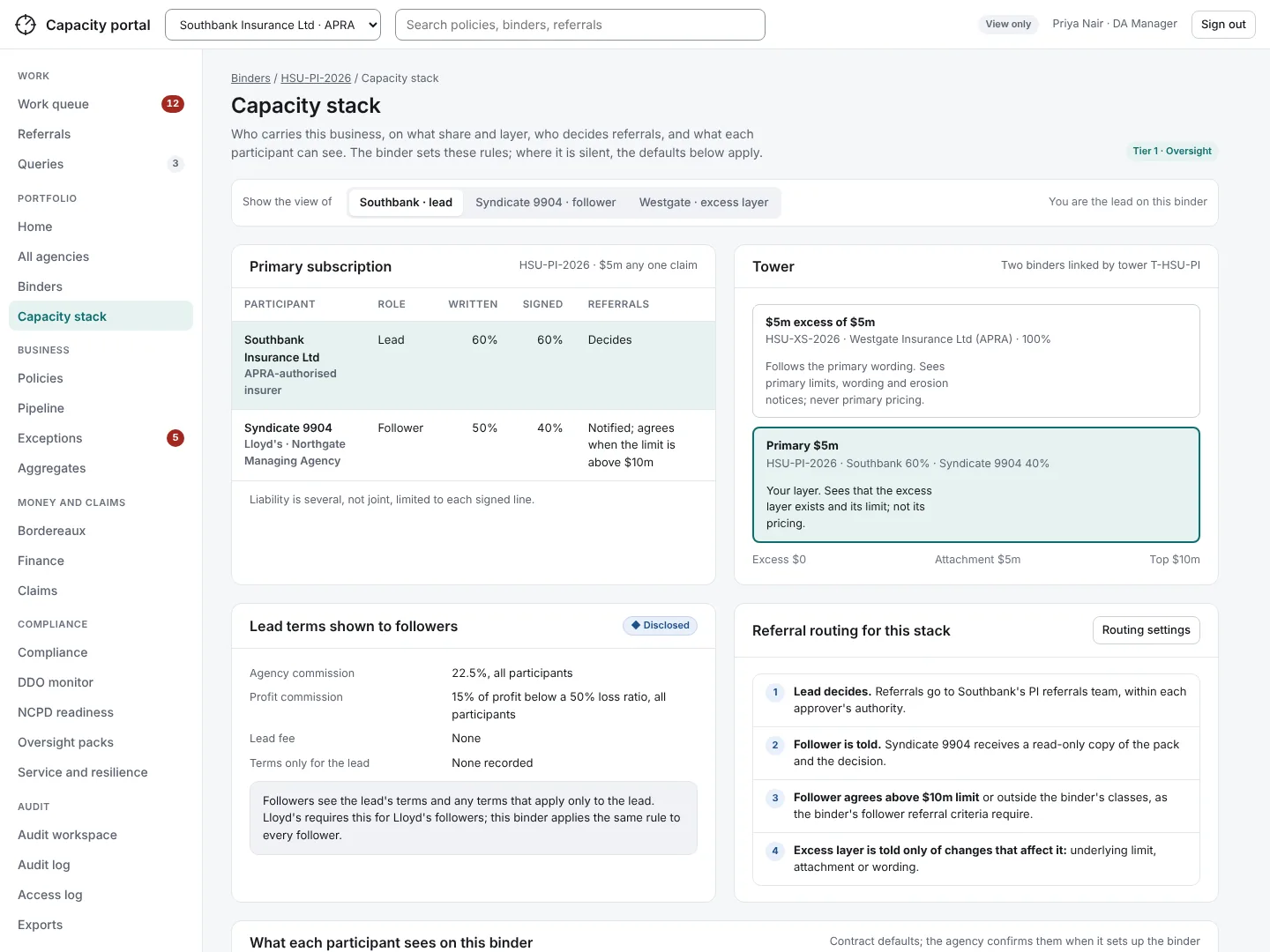
Working with several agencies
One work queue for every agency that connects you.
A capacity provider that backs several agencies signs in once and works from one list: referrals awaiting a decision, replies to questions, late or failed bordereaux, authority breaches, capacity and aggregate alerts, queries and audit actions. Items are ordered by due time and exposure. Your teams, routing rules and cover arrangements decide who works each item. Referrals are never approved in bulk.
Each agency decides whether its business appears in your cross-agency views, and can see that it does.
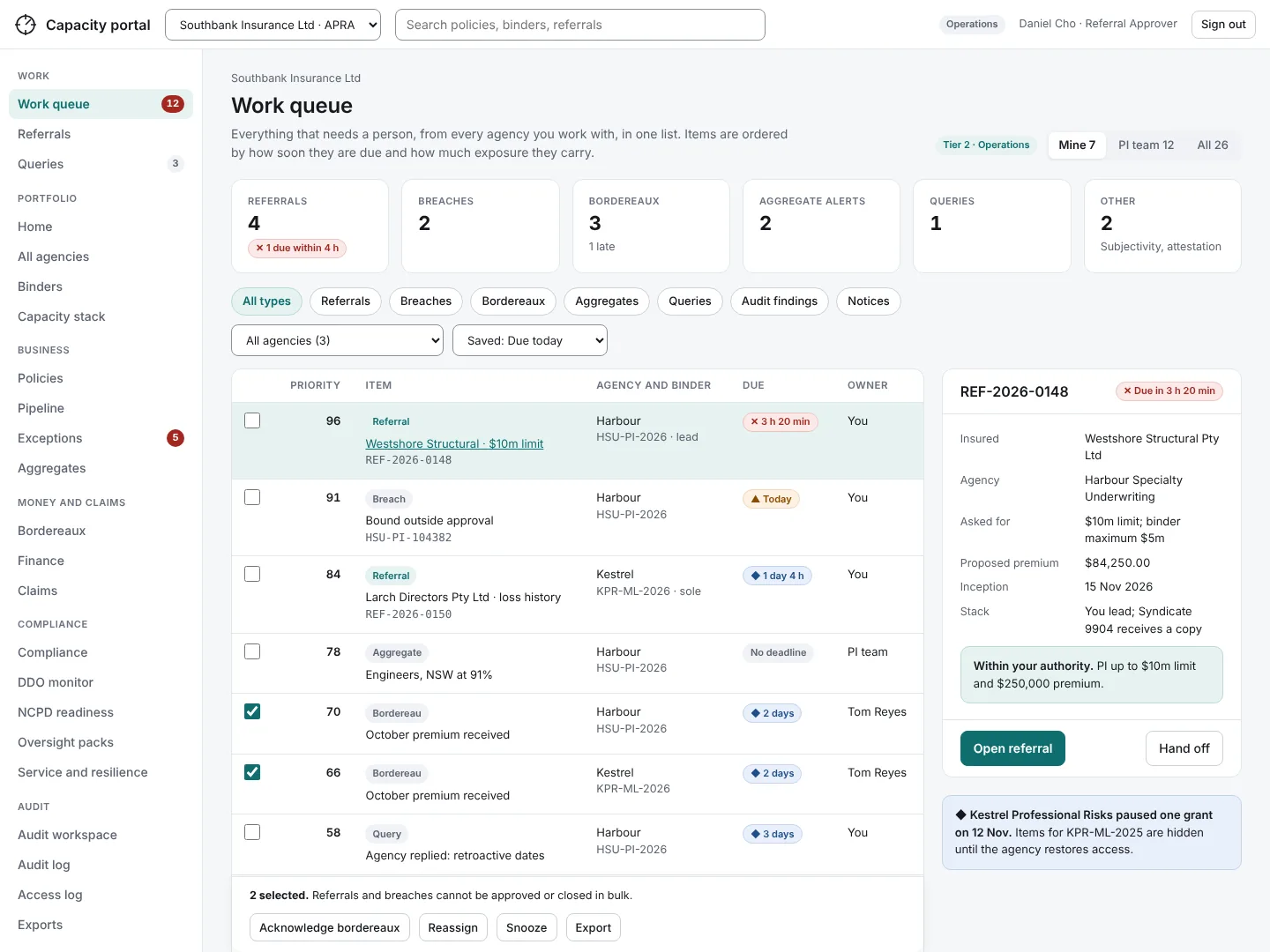
APRA-authorised insurers and Lloyd’s syndicates
Each licensed entity sees its business on its own terms.
APRA-authorised insurers
Your binder references, underwriting year and bordereau template. Service levels, incidents and material platform changes for your CPS 230 and CPS 234 monitoring. A monthly oversight pack for each binder for your board and accountable persons under FAR. NCPD data readiness, and a DDO monitor for retail products.
Lloyd’s managing agents
The binder UMR, year of account and CRS v5.2 bordereaux. The lead’s terms disclosed to followers. An audit workspace for samples, evidence packs and findings.
A group that holds both an APRA-authorised insurer and a Lloyd’s syndicate sees each entity separately, with its own users, contracts and reports.
Getting access
Standard access comes with the agency. More is available on application.
When an agency invites you
The agency’s subscription covers it. You decide referrals, receive and query bordereaux, raise queries, and see the access log and service records for that agency’s binders, with the oversight modules the agency grants.
Set-up is self-service: confirm your organisation, consent to the agency using Cuttleflow, accept the access terms, and name your referral approvers and notification contacts.
When you work with several agencies
One work queue and referral register across agencies, with your own teams, routing, due times and cover while someone is away. Portfolio adds accumulation across agencies, oversight packs across agencies, guest auditors, data feeds, and binders from agencies not on Cuttleflow.
Provided under a service agreement with a CPS 230 schedule, with assisted set-up and a period running alongside your current process.
Pricing on application.
Referral decisions and the records your oversight depends on are never behind a paid service. If you stop paying for Operations or Portfolio, you return to standard access for each agency.
The records underneath
Four questions you will ask a coverholder on Cuttleflow, and the answers.
02 · Replay
“Can you reproduce a premium from two years ago?”
Rule packs are versioned and immutable once live. Any historic quote replays to the same number, and shows which rule version and which wording version applied on the day.
03 · The ledger
“What is your audit trail?”
A hash-chained ledger written before each state change takes effect. Nothing is overwritten; corrections reference what they correct. What you receive is evidence produced as the work was done, not a report assembled when you asked.
04 · Bordereaux
“Will our bordereaux arrive clean and on time?”
Generated from the same records the policies were bound against, to the delegated-authority standard, with the Australian premium components carried as named fields from the day of binding.
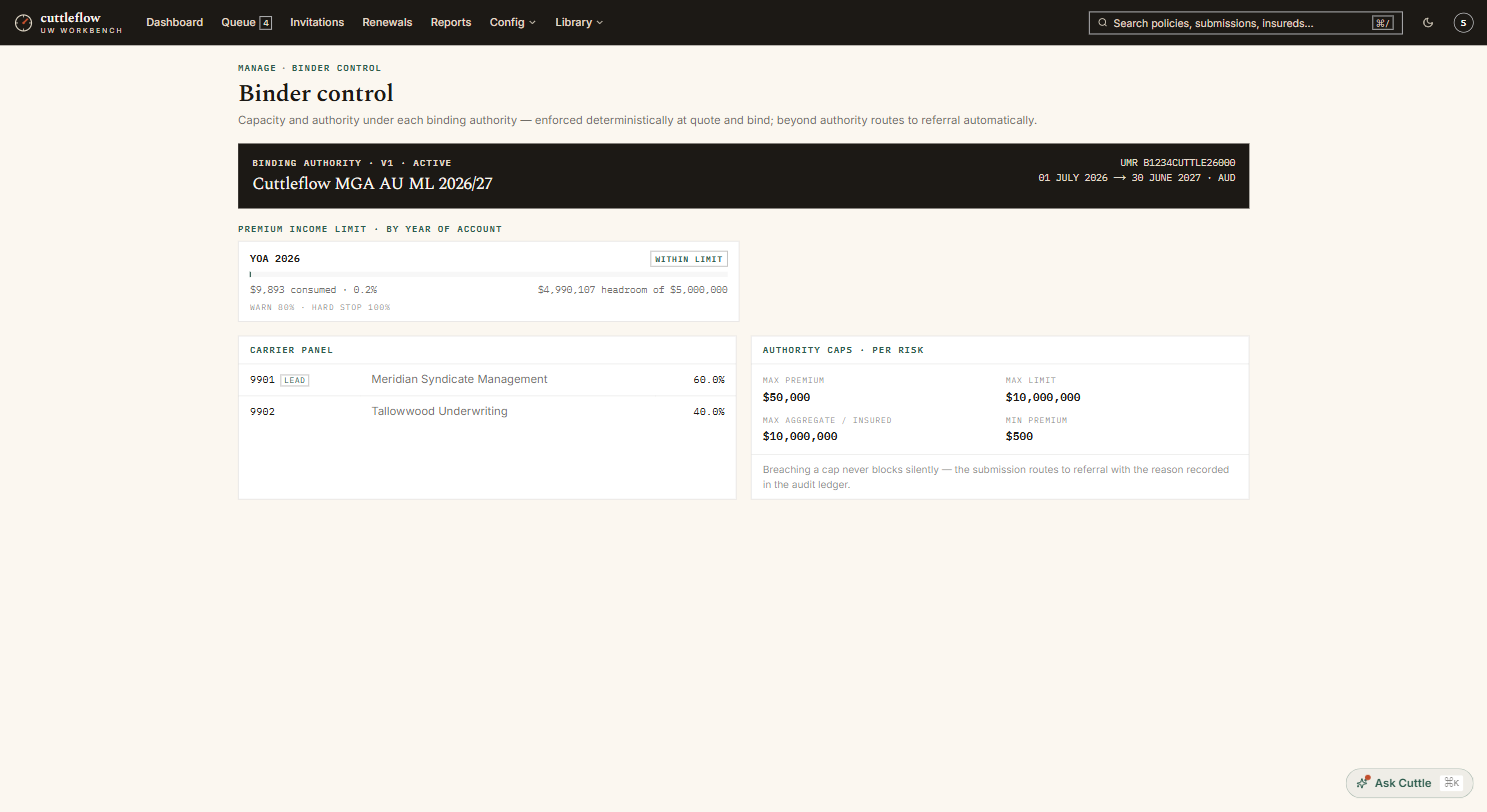
Binder control, as the agency’s underwriter sees it
Every delegated authority the agency writes under: the carrier panel and each syndicate’s share, the products and territories in scope, the authority caps and the premium income limit by year of account. Enforced at quote and bind; headroom updates as business is written.
Binder control in the product tour →
The same screen in the ninety-second recording →
Demonstration data. The carrier names and syndicate numbers are placeholders.
Ask about access
See the designs, and tell us what your oversight team needs.
The Capacity Portal is in development. The screens on this page are design previews with invented sample data. If you provide capacity to an agency on Cuttleflow, or are considering it, we will take you through the designs and the controls documentation.
Starting an agency? Getting to market →